
Como Criar Imagens PNG Transparentes para Qualquer Projeto
Guia completo para criar e usar imagens PNG transparentes para design, web, apresentações e projetos impressos.
Por Ahmet C. Toplutaş · Última atualização 11 de outubro de 2026 · Padrões editoriais
Neste site
Abra a ferramenta. Assunto executa o modelo no navegador. Cor da borda remove só a cor que toca a borda externa e mantém as áreas internas dessa cor. A primeira execução em Assunto baixa o modelo. O tempo depende do aparelho. Veja a transparência no xadrez e depois no branco, preto ou numa cor personalizada. Baixe um PNG transparente como arquivo mestre. O PNG chapado ou o JPEG só depois de uma cor sólida. JPEG não guarda transparência. Cabelo, vidro, correntes finas e baixo contraste podem falhar.

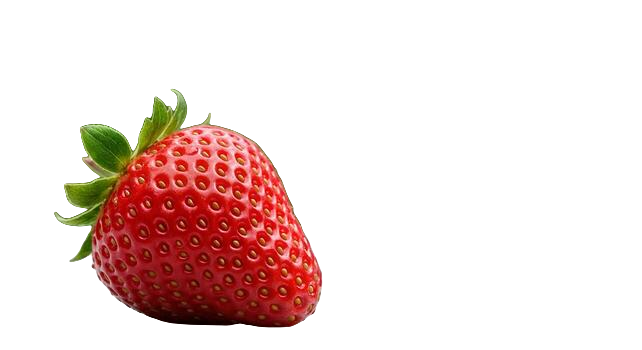
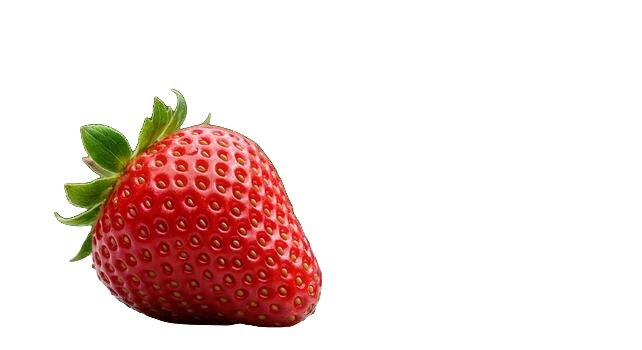

Imagens PNG transparentes são essenciais no design, desenvolvimento web e criação de conteúdo. Seja construindo um site, criando uma apresentação ou desenvolvendo materiais de marketing, fundos transparentes oferecem a flexibilidade de sobrepor imagens perfeitamente em qualquer projeto.
O Que É um PNG Transparente?
PNG (Portable Network Graphics) é um formato de imagem que suporta transparência através de um canal alfa. Diferente do JPEG, que sempre tem um fundo sólido, o PNG pode armazenar informações de transparência por pixel. Isso significa que você pode ter uma imagem de uma pessoa, produto ou objeto sem fundo - apenas o assunto cercado por transparência.
Usos Comuns para PNGs Transparentes
- Design web: Logos, ícones e imagens de produtos que precisam ficar sobre qualquer cor ou padrão de fundo.
- Apresentações: Imagens que se integram perfeitamente aos slides sem uma caixa branca indesejada ao redor.
- Redes sociais: Sobreposições, adesivos e gráficos que se integram com suas publicações e stories.
- Design impresso: Elementos para panfletos, brochuras e pôsteres que precisam sobrepor outro conteúdo.
- Vídeo: Sobreposições e legendas que precisam de fundos transparentes para composição.
Como Criar um PNG Transparente
A maneira mais rápida é usar uma ferramenta de remoção de fundo com IA. Envie qualquer imagem - seja uma foto, captura de tela ou gráfico - e a IA isolará o assunto e produzirá um PNG transparente em segundos. Sem necessidade de Photoshop ou habilidades de design.
Para imagens existentes com fundos de cor sólida, você também pode usar as ferramentas "varinha mágica" ou "selecionar cor" em editores de imagem para remover o fundo manualmente. No entanto, ferramentas de IA lidam com bordas complexas (como cabelos e objetos detalhados) muito melhor e mais rápido.
Dicas para Trabalhar com PNGs Transparentes
Tenha em mente que PNGs transparentes são arquivos maiores que JPEGs. Para uso na web, otimize seus PNGs com ferramentas de compressão para manter os tempos de carregamento rápidos. Ao compartilhar imagens transparentes, sempre use o formato PNG - salvar como JPEG substituirá a transparência por um fundo branco.
Canais alfa sem dor de cabeça técnica
A transparência no PNG é armazenada por pixel como um valor alfa. Pixels totalmente opacos mantêm a cor do objeto; pixels totalmente transparentes desaparecem e revelam o que estiver embaixo no layout. O alfa parcial cria bordas suaves, úteis para cabelo e curvas suavizadas, e arriscadas se a origem for um JPEG de baixa qualidade que já borrou essas bordas.
Por isso exportar como PNG a partir de um removedor de fundo faz diferença. Salvar o mesmo resultado como JPEG achata o alfa numa cor sólida (normalmente branco) e desfaz o trabalho. O WebP também carrega alfa, mas o PNG continua sendo o formato de entrega mais seguro para marketplaces, gráficas e ferramentas de design antigas.
Onde os PNG transparentes quebram na prática
- Clientes de e-mail: alguns removem ou ignoram a transparência; teste sobre uma célula com cor de marca.
- Envios para redes sociais: as plataformas recomprimem e podem inserir um fundo; guarde um master de backup.
- Software RIP de impressão: confirme se a gráfica espera PNG com alfa ou prefere um PDF achatado com o fundo pretendido.
- Pipelines de imagem de CMS: conversores automáticos às vezes forçam JPEG; desative isso para logotipos e recortes.
Checklist de qualidade após exportar
Abra o PNG sobre um xadrez escuro e outro claro, ou simplesmente alterne a cor de fundo da página. Halos aparecem como franja clara sobre escuro e como manchas escuras sobre claro. Halos suaves costumam vir da compressão da foto original; reexportar de uma fonte melhor supera qualquer suavização interminável num editor.
O tamanho do arquivo pode explodir em fotos grandes de produto. Se uma landing page parecer pesada, mantenha o master transparente em resolução plena no armazenamento e sirva aos visitantes um PNG ou WebP redimensionado. Não recomprima o master num JPEG minúsculo "por comodidade".
Da foto ao ativo reutilizável
Use o criador de fundo transparente quando precisar de um recorte rápido e guarde depois o PNG ao lado do RAW ou do JPEG original no seu gerenciador de ativos ou pasta do Drive. Nomeie com clareza (sku-123-recorte.png) para que ninguém da equipe recorte a mesma foto seis meses depois.
Quem trabalha no Figma ou no Canva deve colocar o PNG num quadro que corresponda ao recorte final e duplicar variantes para interfaces em modo claro e escuro. Um único master com alfa limpo evita o problema das máscaras "quase iguais, mas ligeiramente diferentes" que se infiltra nos kits de marca.
Quando não forçar a transparência
Fotos de estilo de vida em página inteira, fundos texturizados que fazem parte da narrativa e capturas de interfaces já desenhadas sobre uma tela específica raramente ganham com um recorte. Remova fundos quando o objeto precisar viajar entre contextos (produto, pessoa, logotipo, ícone), não quando o ambiente for a mensagem.
Gestão de cor e véus inesperados
Às vezes um PNG parece perfeito na pré-visualização do navegador e ganha um véu claro em outro aplicativo. Isso costuma vir de conversão de perfil de cor ou de uma camada com modo de mesclagem incorreto. Achate apenas na exportação final do canal que exige fundo sólido e mantenha o master com alfa intocado.
Se precisar enviar um arquivo transparente a um cliente cujo programa não abre bem o alfa do PNG, mande um ZIP com o PNG mais uma prévia em JPEG sobre cinza e sobre a cor da marca, para que a intenção fique clara mesmo se o programa de e-mail falhar.
Pronto para experimentar?
Remova fundos de suas imagens gratuitamente - sem necessidade de cadastro.
Experimente o nobackground Grátis